
Scenario
Application Security Groups (ASGs) provide an easy way to group together Azure resources like VMs and create simple‑to‑read NSG rules to control traffic between resources.
When resources like virtual machines exist in the same subnet, Azure virtual networks allow full connectivity between them. But sometimes you need to restrict access, for example, web apps or network shares that should not be accessible across departments.
One solution is to separate VMs into their own subnets and associate NSGs with each subnet. However, this requires subnet creation, multiple NSGs, rule management, IP changes, and potential downtime. For existing environments, this adds time, cost, and redesign overhead.
Instead, ASGs can be used to segment VMs within the same subnet a technique known as micro‑segmentation. ASGs simplify NSG rules and reduce the number of NSGs required.
Lab Objectives
- Segment VMs on the same shared subnet using Application Security Groups
- Use ASGs to simplify NSG rule creation
- Demonstrate how ASGs can control traffic between workloads
- Validate segmentation using PowerShell connectivity tests
Prerequisites
- Azure subscription
- Resource group
- Virtual network with subnets
- Three Windows Server VMs
- Azure Bastion (recommended)
Lab Overview
The following Azure resources were used:
- A resource group
- A virtual network (VNET) with subnets
- 3 Windows Server VMs
- Azure Bastion (secure RDP/SSH access without exposing VMs to the internet)
- 3 Application Security Groups (ASGs)
- 1 Network Security Group (NSG)
Azure Bastion is recommended since VMs are not accessible over the internet.
Why Use Application Security Groups?
- Azure VNETs allow full connectivity between VMs in the same subnet
- Some workloads must be isolated (e.g., finance, HR, core services)
- Subnet‑level segmentation may require redesign and downtime
- ASGs allow micro‑segmentation without moving VMs
- NSG rules become easier to read and maintain
- VMs can be added or removed from ASGs to inherit rules dynamically
How the Architecture Works
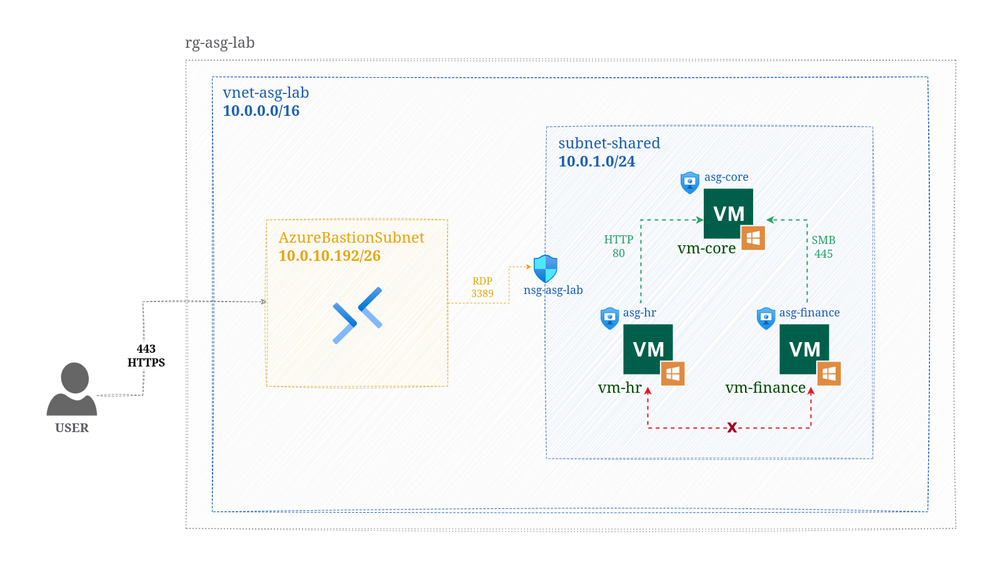
- Three Windows Server VMs are created in the same subnet
- Each VM is added to its own ASG
- A single NSG is associated with the subnet
- NSG rules reference ASGs instead of IP addresses
This allows you to control traffic between workloads inside the same subnet.
Connectivity Testing
PowerShell was used to test connectivity using VM IP addresses and service ports.
Test: vm‑finance → vm‑core (SMB)
Test-NetConnection -ComputerName 10.0.1.x -Port 445
Result: Allowed
Test: vm‑finance → vm‑hr
Test-NetConnection -ComputerName 10.0.1.x
Result: Blocked
Test: vm‑hr → vm‑core (HTTP)
Test-NetConnection -ComputerName 10.0.1.x -Port 80
Result: Allowed
Test: vm‑hr → vm‑finance (SMB)
Test-NetConnection -ComputerName 10.0.1.x -Port 445
Result: Blocked
Results
- ASGs successfully controlled traffic between VMs in the same subnet
- Allowed and denied connections matched the NSG rules
- No subnet redesign or IP changes were required
- Micro‑segmentation was achieved using a single NSG
Conclusion
This lab successfully demonstrated ASG‑based micro‑segmentation in a shared subnet. ASGs provide flexibility when controlling traffic in an Azure virtual network, allowing VMs to inherit predefined NSG rules simply by adding or removing them from ASGs.
